Written by: Mariana Fonseca, Editorial Team, AI Growth Agent
Key Takeaways for HubSpot’s Free Plan
- HubSpot’s free plan caps marketing contacts at 1,000 and monthly email sends at 2,000, with no workflow automation available.
- Mandatory HubSpot branding on all outbound assets can hurt credibility and deliverability for mid-market teams.
- Storage, reporting, and user limits on the free tier quickly become constraints once teams scale beyond early-stage use.
- Compared with Zoho CRM and Mailchimp free tiers, HubSpot offers broader CRM features but stricter branding and automation restrictions.
- For teams ready to move beyond free-tool ceilings and build AI-search visibility, schedule a demo with AI Growth Agent to explore a tailored growth strategy.
Snapshot of HubSpot Free Plan Limits (2026)
The table below summarizes the primary hard limits on HubSpot’s free plan. Verify every quota against HubSpot’s current pricing page before acting, because HubSpot adjusts plan boundaries periodically.
| Feature | Free Plan Quota | Source / Year | Notes |
|---|---|---|---|
| Marketing contacts | up to 1,000 total contacts (free storage for up to 1,000 non-marketing contacts) | HubSpot Marketing Contacts, 2026 | Hard cap, contacts above limit cannot receive marketing emails |
| Monthly marketing email sends | 2,000 | HubSpot Marketing Pricing, 2026 | HubSpot branding appended to all outbound emails |
| Users | up to 2 users | HubSpot CRM Pricing | Limited to 2 users on the free CRM core |
| Marketing automation (workflows) | Not included | HubSpot Marketing Pricing, 2026 | Workflow automation requires Starter or above |
| Reporting dashboards | 10 dashboards with up to 50 reports each | HubSpot free CRM limitations | Advanced custom reporting locked to Professional tier |
| Landing pages | 30 (with HubSpot branding) | HubSpot free CRM limitations | Custom domains and branding removal require Professional tier |
| File storage | 20 MB | Supported file types and sizes | Paid tiers scale storage significantly |
Confirm each figure directly with HubSpot before making a budget or migration decision, because plan boundaries can change without notice.
Core Limits of HubSpot’s Free Plan
The free plan’s most consequential constraint is the contact ceiling. HubSpot’s free plan allows up to 1,000 total contacts (free storage for up to 1,000 non-marketing contacts). Contacts stored in the CRM above that threshold cannot receive marketing emails. A growing list can silently stop receiving campaigns without an obvious error message.
This cap arrives faster than many teams expect. A newsletter, a simple nurture sequence, or a few gated assets can push an active list toward the ceiling within a few months.
Automation is absent entirely. The free plan includes no workflow triggers, no automated follow-up sequences, and no lead-rotation rules. Every action that would otherwise run automatically must be executed manually. Manual execution introduces inconsistency and limits the plan’s utility for any team managing more than a handful of deals at once.
HubSpot branding appears on all outgoing emails, landing pages, and forms. For mid-market teams, this branding affects more than aesthetics. It signals that the sender operates on a free tool, which can reduce perceived credibility and depress open rates. Removing HubSpot branding requires upgrading to the Professional or Enterprise tier.
Storage is capped at 20 MB, which restricts teams that manage image assets, attachments, or document libraries. Reporting is limited to 10 dashboards with up to 50 reports each, and custom report builders sit behind Professional-tier pricing.
When HubSpot’s Free Plan Still Makes Sense
Solo operators and early-stage teams with a few hundred contacts and no automation needs can extract real value from the free plan. They gain a functional CRM, basic deal pipeline management, and a limited email tool without a subscription cost.
For mid-market teams, the calculus changes quickly. The 1,000-contact ceiling, the absence of automation, and the mandatory HubSpot branding combine to create a tight operating box. Most growing teams reach that box within months of launch. The free plan functions more like a trial environment than a durable operating tier.
The branding restriction also affects deliverability. Persistent HubSpot branding on outbound email can influence reputation, because the sending domain shares HubSpot’s infrastructure rather than relying solely on the brand’s own domain reputation.
HubSpot Free vs Starter: Practical Differences in 2026
The table below compares HubSpot’s free plan with the Starter tier across six evaluation criteria. Confirm pricing at HubSpot’s pricing page before budgeting, because HubSpot adjusts pricing periodically.
| Criterion | Free Plan | Starter Tier | Notes |
|---|---|---|---|
| Marketing contacts | up to 1,000 total contacts (free storage for up to 1,000 non-marketing contacts) | 1,000 included; purchasable in increments | Starter contact pricing scales with list size |
| Monthly email sends | 2,000 | 5x contact tier per month | Starter removes the hard 2,000 ceiling |
| Automation (workflows) | None | Simple automation included | Advanced branching logic requires Professional |
| HubSpot branding | Mandatory on all assets | Not removed | Branding removal requires Professional or Enterprise tier |
| Reporting | 10 dashboards with up to 50 reports each | 10 dashboards, 10 reports each | Custom report builder requires Professional |
| Support | Community only | Email and in-app chat | Phone support requires Professional or Enterprise |
How the Contact Cap Forces Upgrades
The contact cap mentioned earlier is the most common upgrade trigger reported in HubSpot community threads. A team running a standard lead-generation program, a webinar series, or a content download funnel can reach this ceiling within the first quarter of active use.
Contacts stored above the cap remain in the CRM but are excluded from email sends. Teams can unknowingly send campaigns to only a fraction of their actual list.
The upgrade economics at this trigger point depend on list size. Moving to Starter with a modest contact tier is manageable for most teams. Costs rise non-linearly as contact counts grow, so teams that expect rapid list growth should model a 12-month contact trajectory before committing to a tier. Mid-year upgrades to higher contact bands can create unplanned cost spikes.
How Email Limits and Branding Shape Campaigns
The free plan caps outbound marketing email at 2,000 sends per month. For a list at the 1,000-contact ceiling, this allows two sends per contact per month. That cadence works for low-frequency newsletters but fails for promotional sequences, re-engagement campaigns, or event-driven triggers.
Every email sent on the free plan carries mandatory HubSpot branding in the footer. This affects deliverability in two ways. Some recipients recognize the branding as a free-tool signal and engage less, which lowers open and click rates. The free tier also uses shared sending infrastructure, so deliverability depends partly on the behavior of other free-plan users in the same pool.
Paid tiers provide more controlled sending infrastructure and support for a custom sending domain. Both improvements strengthen deliverability reputation over time.
HubSpot Free vs Zoho and Mailchimp Free Tiers
The table below compares HubSpot’s free plan with the free tiers of Zoho CRM and Mailchimp across primary evaluation criteria. Verify current limits at Zoho CRM pricing and Mailchimp pricing before choosing a platform, because free-tier limits change frequently.
| Criterion | HubSpot Free | Zoho CRM Free | Mailchimp Free |
|---|---|---|---|
| Contact limit | up to 1,000 total contacts (free storage for up to 1,000 non-marketing contacts) | Up to 3 users; no published contact cap on CRM records | 250 contacts |
| Email sends per month | 2,000 | Not a native CRM email marketing feature on free tier | 500 per month |
| Automation | None | Basic workflow rules included on free tier | Single-step automations only on free tier |
| Branding on outbound | Mandatory HubSpot branding | Zoho branding on free tier | Mailchimp branding on free tier |
| Upgrade entry cost | Starter tier; verify at HubSpot pricing | Standard tier; verify at Zoho pricing | Essentials tier; verify at Mailchimp pricing |
Zoho CRM’s free tier offers more permissive automation rules but restricts the plan to three users, which blocks larger teams. Mailchimp’s free tier has a lower contact cap than HubSpot’s but focuses on email marketing rather than full CRM functionality. HubSpot’s free plan covers the broadest feature set of the three but imposes the most visible branding restrictions on outbound communications.
What Real Users Say About HubSpot Free
Patterns in HubSpot’s community forums and third-party review threads on platforms like Reddit’s HubSpot community cluster around three recurring pain points.
Branding frustration appears first. Users report that mandatory HubSpot footer branding on emails and landing pages creates friction with clients and prospects who see it as a free-tool signal. Agencies and consultants who send on behalf of clients mention this most often.
The second theme is the automation gap. Teams that migrate from other platforms expecting basic drip sequences or lead-assignment rules discover that none of those workflows exist on the free plan. Onboarding materials do not highlight this absence clearly, so many teams notice the gap only after investing time in CRM setup.
The third theme is the contact cap trigger. The 1,000-contact ceiling is the most common reason for an unplanned upgrade. Teams that run inbound lead generation, event registration, or content download programs report hitting the cap faster than expected, often within two to three months of active use.
Upgrade Decision Framework for Growing Teams
The upgrade decision from free to Starter becomes straightforward when any one of three conditions appears. First, the contact list approaches 800 to 900 contacts, which forces a decision before hitting the hard cap. Second, the team needs to remove HubSpot branding from client-facing communications to protect credibility. Third, an automation requirement emerges that cannot be handled manually at scale.
These three constraints usually converge within six to twelve months for a team running active lead generation. Lead generation grows the contact list, increases the volume of client-facing communications, and introduces workflow complexity that demands automation.
The move from Starter to Professional is more consequential. Professional unlocks advanced automation, custom reporting, and A/B testing at a substantially higher price point. Teams typically justify this tier when they run multi-step nurture sequences, need attribution reporting, or manage contact volumes that require complex segmentation logic.
Teams should model a 12-month contact trajectory before selecting a tier. HubSpot’s contact-band pricing means a team projecting 10,000 contacts faces a very different cost structure than one projecting 2,000. The upgrade path does not follow a simple linear curve.
Best-Fit Use Cases for HubSpot Free
The free plan works well for solo operators, early-stage startups with a few hundred contacts, and teams that need a basic deal pipeline and contact database without email marketing requirements. It also serves as a safe evaluation environment for teams testing whether HubSpot’s interface and data model fit their workflow before committing to a paid tier.
The free plan does not function as a long-term operating tier for mid-market teams running active lead generation, content marketing, or programs that depend on automation, deliverability, or brand-consistent communications. For those teams, the upgrade decision concerns timing rather than intent.
Teams focused on long-term AI-search visibility face a separate constraint. Free-plan limits on content publishing, branding, and automation restrict the production and distribution of the authoritative, structured content that AI surfaces like ChatGPT, Perplexity, and Google’s AI Mode use to cite brands. A CRM, regardless of tier, does not solve this visibility problem.
Teams that need narrative control across AI search require a dedicated content and technical SEO engine, not a CRM upgrade. That engine maps the brand’s query universe, publishes structured content, and maintains the technical layer that AI systems can crawl and trust.
Risks and Limits Shared by Free CRM Tools
Free CRM and email marketing tools share structural risks that apply across vendors. Shared sending infrastructure places part of deliverability outside the team’s control. Mandatory branding on outbound communications affects perceived credibility. Contact and send caps create hard ceilings that force unplanned upgrade decisions at inconvenient moments.
AI-search visibility introduces an additional risk. Free tools do not generate the structured, authoritative content that AI surfaces cite. A brand that relies on a free CRM for its marketing infrastructure is not building the content layer that determines whether it appears in ChatGPT, Perplexity, or Google’s AI Mode when prospects ask relevant questions.
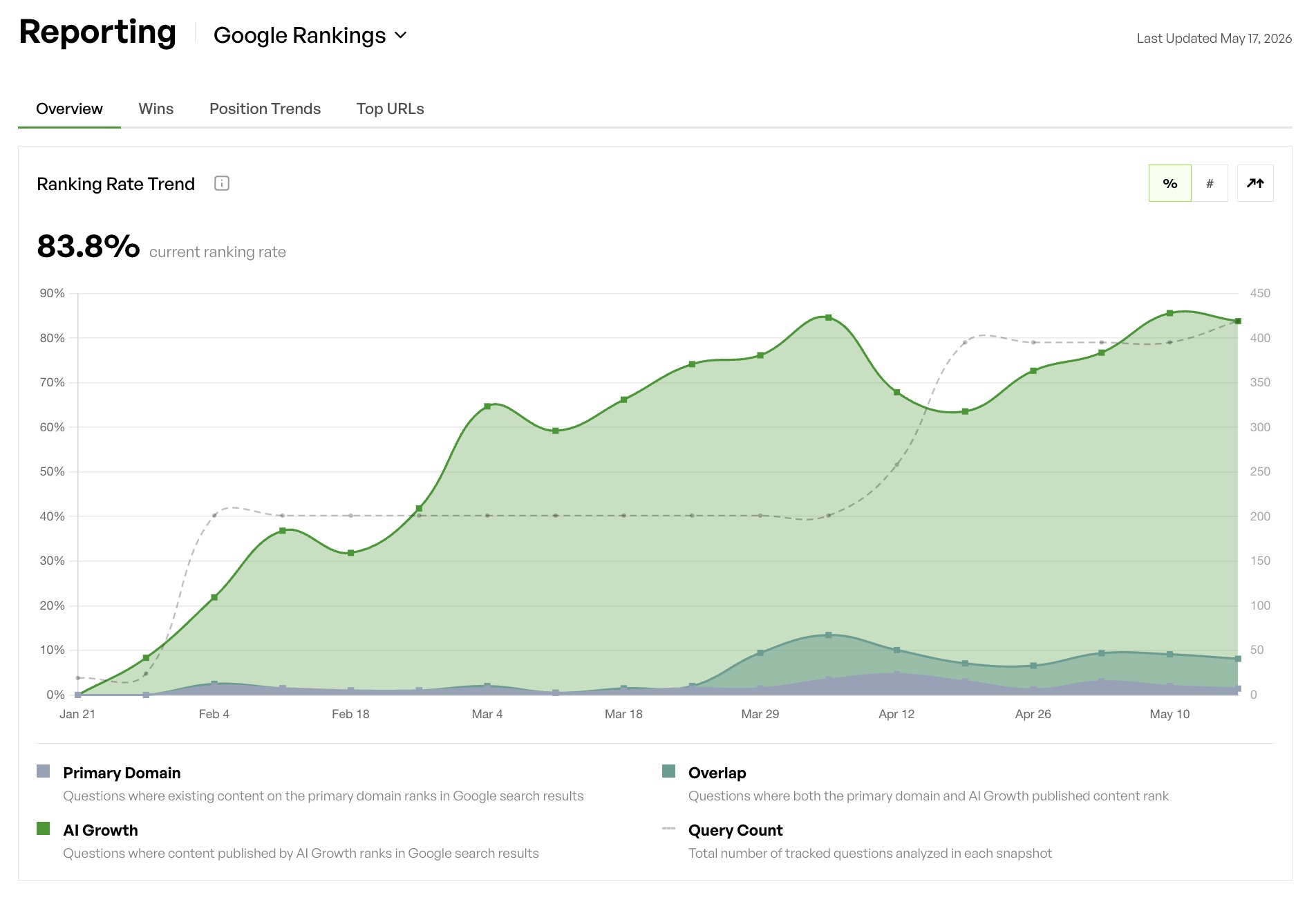
That gap compounds over time. Competitors that invest in authoritative, structured content accumulate citations, while the brand that relies on free tools does not.
Decision Matrix: If-Then Checklist
If your contact list is below 500 and you have no automation requirements, then the free plan is a workable starting point for CRM and basic email.
If your list is approaching 800 contacts or you are running any inbound lead generation program, then budget for the Starter upgrade within the next quarter.
If you are sending client-facing communications and cannot accept HubSpot branding in the footer, then the free plan is not viable regardless of list size.
If you need automated follow-up, lead assignment, or drip sequences, then the free plan does not support your use case and Starter becomes the minimum viable tier.
If you need advanced reporting, A/B testing, or multi-step nurture logic, then Professional is the appropriate tier and the cost model should be evaluated against a full 12-month contact projection.
If your growth goal includes appearing in AI search results when prospects ask questions in your category, then no HubSpot tier addresses that requirement, and a dedicated content and technical SEO engine is the appropriate investment.
If you are evaluating Zoho CRM’s free tier as an alternative, then confirm whether your team exceeds three users, because the free tier is restricted to three seats regardless of contact volume.
If you are evaluating Mailchimp’s free tier, then note the 250-contact cap and single-step automation restriction before committing to a migration.
Frequently Asked Questions
How long does it typically take to outgrow HubSpot’s free plan?
The timeline depends on the pace of lead generation. Teams running active inbound programs, content downloads, or event registrations commonly reach the 1,000-contact ceiling within two to four months. Teams with lighter acquisition activity may operate on the free plan for six to twelve months before hitting the limit.
The automation gap often becomes a constraint before the contact cap for teams with workflow requirements, because there is no workaround for the absence of automation on the free tier.
Does removing HubSpot branding require a paid plan?
Yes. HubSpot branding is mandatory on all outbound emails, landing pages, and forms on the free plan. As noted earlier, only Professional or Enterprise tiers allow branding removal. This requirement is one of the most common reasons teams upgrade earlier than planned, especially when they send communications to clients or prospects who may question the free-tool signal.
How does HubSpot’s free plan compare to Zoho CRM and Mailchimp for a small team?
HubSpot’s free plan offers the broadest feature surface of the three, including a full CRM, deal pipeline, and basic email marketing in a single interface. Zoho CRM’s free tier includes basic automation rules but restricts usage to three users, which blocks larger teams.
Mailchimp’s free tier focuses on email marketing with a 250-contact cap and single-step automations, making it the most limited option for teams that need CRM functionality alongside email. The right choice depends on whether the team’s primary need is CRM, email marketing, or both, and whether the user count exceeds three.
What is the difference between HubSpot Starter and Professional for mid-market teams?
Starter removes HubSpot branding, increases the email send limit, and adds simple automation. Professional adds advanced multi-step workflow automation, custom reporting, A/B testing, and significantly higher contact and send limits.
For mid-market teams running complex nurture sequences, attribution reporting, or segmentation logic, Professional usually fits better. The cost difference between Starter and Professional is substantial, so the decision should rest on a clear inventory of which Professional features the team will use within the first twelve months.
Can a CRM upgrade solve AI-search visibility problems?
No. CRM platforms, including HubSpot at any tier, are not designed to produce the structured, authoritative content that AI surfaces like ChatGPT, Perplexity, and Google’s AI Mode use to cite brands. A CRM manages contacts, deals, and communications.
AI-search visibility requires a dedicated content and technical SEO engine that maps the brand’s query universe, produces authoritative long-tail content, and publishes it with schema, bot-readable structure, and self-healing mechanisms. These capabilities allow AI surfaces to find, trust, and cite the brand. CRM upgrades and AI-search visibility represent separate problems that require separate solutions.
Conclusion: Choosing a Path Beyond HubSpot Free
HubSpot’s free plan offers a functional starting point for small teams with limited contact volumes and no automation requirements. For mid-market teams, it operates as a trial environment with a predictable upgrade timeline driven by the 1,000-contact ceiling, the absence of automation, and mandatory branding restrictions.
Side-by-side comparisons with Zoho CRM and Mailchimp show that each free tier carries a different constraint profile. The right choice depends on the team’s specific mix of user count, contact volume, and feature needs.
The upgrade decision from free to Starter usually arrives within months, not years, for teams running active lead generation. The decision from Starter to Professional requires a clear inventory of which advanced features justify the higher cost. Neither decision solves the separate requirement for AI-search visibility, which demands a dedicated content and technical SEO engine rather than a CRM tier upgrade.