Written by: Mariana Fonseca, Editorial Team, AI Growth Agent
Key Takeaways for a 6-Week HubSpot Rollout
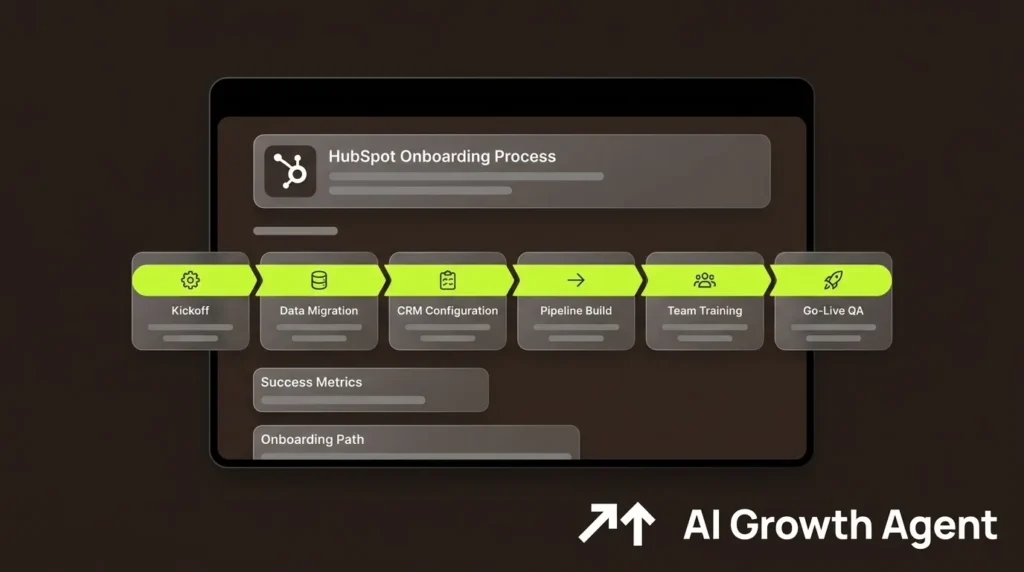
- The HubSpot onboarding process follows a structured six-week implementation covering goal setting, data migration, CRM configuration, pipeline build, team training, and go-live QA.
- Successful onboarding treats the first three weeks as a planning and data project, maintains clear ownership at every phase, and includes active hypercare after go-live.
- Most HubSpot onboarding failures stem from organizational decisions made before configuration begins, such as skipping the design phase, importing dirty data, or over-customizing in the first 90 days.
- Mid-market and enterprise teams typically choose among three onboarding paths: self-serve, partner-led, and AI-automated content layer, each with different speeds, resource requirements, and AI search visibility.
- AI Growth Agent runs as a parallel engine that stands up the content, schema, and technical SEO layer in the same week your HubSpot instance goes live. Schedule a demo to see how the first article can be live within a week of kickoff.
Kickoff and Goal Setting for RevOps-Led Onboarding
The kickoff phase defines measurable objectives, assigns ownership, and documents current processes before any configuration begins. Following the correct implementation sequence reduces rework and cuts total implementation time, and skipping the kickoff phase in particular correlates directly with scope creep and misaligned pipeline stages discovered after go-live. The tasks below create the alignment that prevents those issues and give every stakeholder clear direction from day one.
| # | Task | Owner | Deliverable |
|---|---|---|---|
| 1 | Define three to five measurable goals (e.g., reduce response time by 50%, improve forecast accuracy to within 10%) | RevOps Director | Signed goals document |
| 2 | Appoint executive sponsor and internal HubSpot project owner | VP Sales / RevOps Director | Named RACI chart |
| 3 | Document current sales stages, exit criteria, and MQL definition | RevOps Lead + Sales Leadership | Process map |
| 4 | Identify executive sponsor, power users, and CRM champion with decision authority | RevOps Director | Champion brief |
| 5 | Confirm SSO, calendar sync, and email integration requirements | IT + CRM Champion | Integration checklist |
Account and Technical Setup as the System Foundation
Technical setup creates the HubSpot portal structure, user permissions, and integration architecture before any data enters the system. The Pedowitz Group, which has led more than 400 B2B CRM implementations, states that timelines below six weeks almost always skip the architecture and data audit phases, creating cleanup work within the first 90 days. The five tasks below form the technical foundation that must be stable before any data migration begins, with portal settings and SSO acting as dependencies for every downstream phase.
| # | Task | Owner | Deliverable |
|---|---|---|---|
| 1 | Configure portal settings: time zone, currency, fiscal year, and branding | HubSpot Admin | Portal settings confirmed |
| 2 | Set user roles and permissions by job function | HubSpot Admin | Permission matrix |
| 3 | Connect email, calendar, and SSO | IT + HubSpot Admin | Integration test results |
| 4 | Install and configure the HubSpot tracking code on all web properties | Marketing Ops | Verified tracking report |
| 5 | Define UTM taxonomy and attribution model | Marketing Ops + RevOps Lead | UTM naming convention doc |
Data Migration and CRM Configuration as a Parallel Workstream
Data migration is consistently the longest phase regardless of record volume. Mid-market CRM data migrations covering tens to hundreds of thousands of records typically take six to twelve weeks, with the data migration phase (including cleansing) usually the longest. Because migration alone can consume half the overall timeline, a six-week plan requires data preparation to begin in week one and run as a parallel workstream rather than a sequential phase. The tasks below outline the preparation and configuration sequence that keeps the project on track while mid-market teams work through multi-week data cleanup.
| # | Task | Owner | Deliverable |
|---|---|---|---|
| 1 | Audit legacy data: document record counts, duplicate rates, missing fields, and stale records | RevOps Lead | Data audit report |
| 2 | Deduplicate, normalize, and establish golden records before import | RevOps Lead + CRM Admin | Cleaned data file |
| 3 | Build source-to-target field mapping document | CRM Admin | Field mapping doc |
| 4 | Run sandbox migration and validate record counts, associations, and spot checks | CRM Admin + RevOps Lead | Sandbox validation report |
| 5 | Configure custom properties, lifecycle stages, and lead scoring | HubSpot Admin | Configured HubSpot instance |
| 6 | Execute phased production migration by object type: users, companies, contacts, deals, activities | CRM Admin | Migration completion log |
Pipeline and Workflow Build on a Stable CRM Structure
Pipeline and workflow configuration must follow a stable CRM structure. Building workflows and email automation before the CRM structure is stable causes enrollment logic errors, failed lead routing, and poor suppression rules that scale mistakes across routing, nurture, and reporting. Part of that stable structure is a lean property schema, so limit custom fields to what is genuinely decision-critical, because CRM implementations with a high number of custom fields in the first 90 days show lower user adoption and require more ongoing maintenance. The table below sequences the core build tasks once the underlying structure is in place.
| # | Task | Owner | Deliverable |
|---|---|---|---|
| 1 | Build deal pipeline stages aligned to documented sales process and exit criteria | RevOps Lead + Sales Leadership | Configured pipeline |
| 2 | Configure lead routing and assignment rules | HubSpot Admin | Routing workflow live |
| 3 | Build high-impact automations: follow-up reminders, lifecycle stage transitions, SLA alerts | RevOps Lead | Tested workflow library |
| 4 | Connect priority integrations (email, calendar, billing, marketing automation) | IT + HubSpot Admin | Integration test sign-off |
| 5 | Build reporting dashboards aligned to executive KPIs: pipeline coverage, win rate, MQL-to-SQL conversion | RevOps Lead | Dashboard set live |
6-Week HubSpot Onboarding Timeline by Week
The table below maps each week to its primary owner and key deliverable so teams can see how planning, data work, and configuration overlap. Pre-implementation alignment on lifecycle stage definitions and MQL criteria, combined with clean data and a single named decision authority, can compress a HubSpot implementation timeline by one to two weeks. Data preparation runs as a parallel workstream from week one through week three, while build and training activities ramp in weeks four and five.
| Week | Primary Owner | Key Deliverable |
|---|---|---|
| Week 1 | RevOps Director + IT | Goals signed, RACI confirmed, data audit started, portal and SSO configured |
| Week 2 | CRM Admin + RevOps Lead | Data cleaned and deduplicated, field mapping complete, sandbox migration run |
| Week 3 | HubSpot Admin + RevOps Lead | Custom properties, lifecycle stages, and pipeline stages configured, production migration executed |
| Week 4 | RevOps Lead + Marketing Ops | Workflows live, integrations tested, dashboards built, UAT started with pilot group |
| Week 5 | Sales Manager + RevOps Lead | Role-based training delivered, shadow adoption period, UAT issues resolved |
| Week 6 | Executive Sponsor + RevOps Director | Go-live, legacy system retired, first executive review, hypercare monitoring begins |
Teams that want HubSpot go-live and AI search visibility to land in the same week can align this timeline with an AI Growth Agent rollout. Schedule a demo to see if you are a good fit and see how AI Growth Agent stands up a fully optimized content layer in the same week your instance goes live.
Team Training and Adoption That Actually Stick
Training is the phase most commonly compressed and the one most directly responsible for post-launch failure. A significant portion of information from a single CRM training session is forgotten within days, making one-time onboarding ineffective and resulting in data quality and adoption problems within the first 60 days post-launch. Role-specific, scenario-based training delivered on the finalized system prevents this outcome and gives users confidence before the legacy tool is retired. The tasks below structure training as an ongoing support system rather than a single meeting.
| # | Task | Owner | Deliverable |
|---|---|---|---|
| 1 | Deliver role-specific training: reps (deal creation, activity logging), managers (pipeline views, forecasting), admins (field management, automation) | Sales Manager + HubSpot Admin | Recorded training sessions |
| 2 | Run a two-week shadow adoption period where reps log activity in HubSpot alongside existing tools | Sales Manager | Shadow adoption log |
| 3 | Identify and activate internal super users as ongoing champions | RevOps Director | Named champion list |
| 4 | Establish office hours, escalation paths, and a short-form reference guide for new starters | HubSpot Admin | Support structure documented |
| 5 | Collect friction logs from pilot users and resolve field name, required field, and workflow issues before full rollout | RevOps Lead | Resolved friction log |
Go-Live QA and Success Metrics for the First 30 Days
Go-live marks the start of active monitoring rather than the finish line. HubSpot CRM implementations that include active hypercare maintain higher adoption at six months, while those that skip hypercare average lower adoption at six months. The first 30-day review acts as the most important accountability checkpoint in the entire process, and the tasks below define the QA and monitoring actions that make up effective hypercare.
| # | Task | Owner | Deliverable |
|---|---|---|---|
| 1 | Set legacy CRM to read-only and execute final delta migration | CRM Admin | Cutover confirmation |
| 2 | Validate record counts, associations, and workflow triggers post-migration | RevOps Lead | Go-live validation report |
| 3 | Monitor daily: login frequency, required field completion rate, deals with next steps recorded | HubSpot Admin | Daily adoption dashboard |
| 4 | Run 30-day executive review: active user rate, pipeline coverage vs. quota, data completeness score | Executive Sponsor + RevOps Director | 30-day review deck |
| 5 | Target: 80% or more of licensed users logging in at least three times per week and 90% or higher required property fill rate within 30 days | RevOps Director | Adoption KPI report |
What Usually Goes Wrong in HubSpot Onboarding
The majority of HubSpot onboarding failures trace back to organizational decisions made before configuration begins, not to the software itself. The majority of CRM implementation failures stem from people, process, and sequencing issues rather than technical problems. The pitfalls below summarize the most common patterns documented across hundreds of implementations and highlight where RevOps leaders can intervene early.
- Skipping the design phase. Configuring the portal as you go, without a data model and process map, is the most expensive HubSpot onboarding mistake, based on audits of HubSpot portals over many years.
- Importing dirty data. Importing dirty or outdated records creates duplicate contact and company records, breaks reporting, causes awkward outreach, and makes lifecycle metrics unreliable.
- Undefined lifecycle stages. Relying on default lifecycle stages without aligning sales and marketing definitions leads to mismatched qualification criteria, distorted funnel conversion rates, and confusion over MQL-to-SQL handoffs.
- Over-customization in the first 90 days. Over-customization early in the rollout, as noted in the pipeline build section, correlates with lower adoption and a higher maintenance burden because excessive custom fields create noise for users.
- Single-admin dependency. HubSpot portals with a single-admin dependency create key-person risk, where the departure of the sole knowledgeable admin can cause workflows to break and sales teams to lose basic functionality within days.
- No post-launch ownership. The absence of a designated owner responsible for managing user feedback, reviewing data quality, updating processes, and monitoring adoption leads to gradual system decline.
- Parallel operation running too long. Parallel operation of a legacy CRM and HubSpot should be time-boxed to avoid creating divergent data sets that could require a second cleanup project.
- No AI search layer at launch. A HubSpot instance that goes live without structured content, schema, and technical SEO misses the window to establish brand authority in AI search surfaces from day one, leaving the narrative to competitors and unverified sources.
Onboarding Path Comparison for CRM and AI Search
Mid-market and enterprise teams typically choose among three onboarding paths, each with different timelines, AI search coverage, and trade-offs. The comparison below focuses on implementation speed, how AI visibility is handled, and the risk profile for architecture and data quality.
| Path | Typical Timeline | AI Search Coverage | Key Trade-off |
|---|---|---|---|
| Self-serve | Typically several weeks for small-to-mid market | None by default, requires separate stack | Lowest cost, highest risk of skipped architecture and data phases |
| Partner-led | Often 8 to 14 weeks for mid-market, longer for complex migrations | Rarely included, requires separate agency engagement | Structured delivery, higher cost and slower time to AI visibility |
| AI-automated content layer (AI Growth Agent) | First article live within one week of kickoff, content indexing in as little as ten days | Full stack: schema, technical SEO, agentic discovery, living content from week one | Runs in parallel with any onboarding path, no headcount required on the brand side |
The self-serve and partner-led paths address CRM configuration but leave the AI search layer entirely unaddressed. AI Growth Agent runs as a parallel engine, standing up the content, schema, and technical SEO layer in the same week the HubSpot instance goes live, so the brand narrative is captured across AI surfaces from day one rather than months later.
Conclusion: Turning Onboarding into a Repeatable RevOps Play
A disciplined six-week HubSpot onboarding process succeeds when teams follow the planning-first approach outlined above, maintain clear ownership at every phase, and build in active hypercare after go-live. The checklist structure gives RevOps directors a week-by-week execution plan with named owners and concrete deliverables, closing the gaps that cause many implementations to exceed their timeline or fall short on adoption.
The go-live moment also creates an immediate opportunity that most teams miss. The week a HubSpot instance goes live is the week the brand’s content, schema, and technical SEO layer should also go live, so AI search systems see a consistent story from the first crawl. AI search surfaces, including ChatGPT, Perplexity, and Google’s AI Mode, read, cite, and act on whatever they can find and trust, so a CRM that is live but invisible to AI surfaces leaves the brand narrative to competitors and unverified sources.
AI Growth Agent acts as the headless engine that completes the technical and content layer in parallel with your HubSpot rollout. It maps your full universe of seed terms and long-tail queries, produces authoritative content validated against primary sources, and stands up a fully optimized site you own within the first week, with no headcount required on your side. Across the first twelve weeks, clients see additional AI citations and mentions, additional bot visits, and a lift in impressions.
Schedule a consultation session with AI Growth Agent and see your first article live within a week of kickoff, timed to the same week your HubSpot instance goes live.
Frequently Asked Questions
How long does a realistic HubSpot onboarding process take for a mid-market company?
A realistic mid-market HubSpot onboarding process takes eight to sixteen weeks from kickoff to stable, adopted operation, depending on data complexity, the number of integrations, and how quickly internal stakeholders can make configuration decisions. A six-week timeline is achievable under the conditions outlined in the timeline section, including parallel data preparation, pre-agreed lifecycle definitions, and empowered decision authority. Teams migrating large volumes of contacts, with multiple integrations, or regulated data should plan for additional time. Compressing below six weeks almost always means skipping the data audit and architecture phases, as discussed in the technical setup section above.
What are the most common reasons HubSpot onboarding projects fail or run over schedule?
The most common failure modes are organizational rather than technical. Skipping the design phase and configuring the portal without a data model or process map is the single most expensive mistake, because downstream problems such as undefined lifecycle stages, sprawling custom properties, and broken reporting all trace back to a missing architecture decision made at the start. Importing dirty data compounds the problem immediately, creating duplicate records and unreliable metrics from day one. Low user adoption is the leading post-launch failure mode, often caused by one-time training that does not cover role-specific workflows and by a CRM architecture that reflects management reporting needs rather than daily rep behavior. The absence of a named post-launch owner means small inconsistencies accumulate without correction, and the system degrades within three to six months of go-live.
What KPIs should RevOps teams track to measure HubSpot onboarding success?
The most reliable leading indicators of a successful HubSpot onboarding are adoption rate, required field completion rate, and data accuracy rate. The adoption benchmarks outlined in the go-live section, including 80 percent login frequency and 90 percent property completion, act as leading indicators because they predict downstream forecast accuracy and pipeline health. Data accuracy rate, measured as valid records divided by total records, should be treated as a first-class KPI with a named owner, because poor data quality corrupts every downstream metric including pipeline coverage, win rate, and forecast accuracy. Lagging indicators to track at 60 and 90 days include pipeline stage advancement aligned to the average sales cycle, MQL-to-SQL conversion rate, and sales cycle length, while six-month metrics such as net revenue retention and forecast accuracy within ten percent of actual confirm durable operational value.
How should a RevOps team handle data migration within a six-week HubSpot onboarding timeline?
Data migration must run as a parallel workstream from week one, not as a sequential phase that begins after configuration is complete. The audit and cleansing work, covering deduplication, normalization, and field mapping, should be underway by day three of the project. A sandbox migration should be completed by the end of week two to surface field mapping gaps before any production data moves. The recommended object migration sequence to prevent orphaned records is users first, then companies, contacts, deals, activities, and finally attachments. Production migration executes in week three, with validation covering record count reconciliation, sampled spot checks across 50 to 100 records per object type, and user acceptance testing sign-off from sales, marketing ops, and service representatives. Parallel operation of the legacy CRM and HubSpot should be time-boxed to avoid creating divergent data sets that may require additional cleanup.
What does AI Growth Agent do that a HubSpot implementation partner does not cover?
A HubSpot implementation partner configures the CRM instance, migrates data, builds pipelines and workflows, and trains the team, and that scope ends at the CRM boundary. It does not address how the brand appears in AI search surfaces such as ChatGPT, Perplexity, or Google’s AI Mode, which now act as primary discovery channels for many B2B buyers. AI Growth Agent is the headless engine that completes the layer implementation partners leave unaddressed, mapping the brand’s full universe of seed terms and long-tail queries using real-time Google and ChatGPT data, producing authoritative content validated against primary sources, and standing up a fully optimized site the brand owns within the first week of kickoff. The technical stack ships automatically with every engagement, including rich schema markup, Blog MCP for agent interoperability, llms.txt and llms-full.txt, advanced robots.txt, proper sitemaps, and real-time bot tracking. No headcount is required on the brand side, and the content is living, meaning it self-heals and updates over time rather than going stale the day it ships. The two engagements run in parallel, so the HubSpot instance and the AI search content layer go live in the same week.